Intel MWC 2024.
Designing a guided booth discovery experience for Intel at Mobile World Congress.
Overview
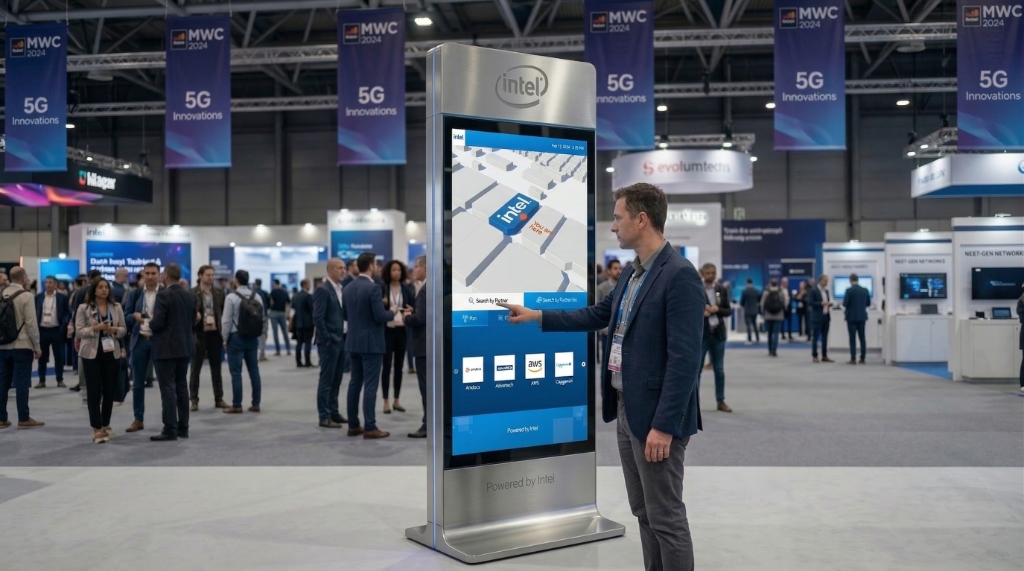
For MWC 2024 in Barcelona, Intel needed an interactive kiosk to help visitors navigate partner demonstrations across the booth. I designed the touchscreen kiosk interface for the Intel booth.
This allowed visitors to explore partner companies, telecom technologies, and demo locations through a guided digital experience. This was the fourth kiosk system I designed for Intel exhibitions, following successful deployments at previous global events. The challenge was to create a visually engaging experience while following strict Intel brand guidelines and an existing kiosk hardware system.
The Problem
The Intel booth at MWC features multiple partner demonstrations across telecom technology areas like RAN, Edge, and Private 5G. Visitors often arrive with limited time and struggle to understand:
- which partners are present
- what technologies they are demonstrating
- where demos are located inside the booth
Without guidance, visitors frequently miss important demonstrations. Intel needed a digital navigation interface to simplify booth exploration and guide visitors quickly to relevant demos.
Product Vision
The goal was to design a kiosk experience that enables visitors to:
- discover partner companies
- explore telecom technology categories
- locate partner demos inside the booth
- access supporting technical assets
"The kiosk needed to serve as a digital navigation hub for the Intel booth experience."
System Thinking.
Designing the kiosk required understanding the entire exhibition ecosystem, not just the interface. The kiosk connects digital discovery with the physical booth environment.
Booth Visitors
Visitors arrive with different goals (exploring, discovering, locating).Kiosk Discovery Interface
Two discovery paths: Search by Partner vs Technology.Partner / Technology Exploration
Solution overviews and Intel technologies used.Demo Locations
Hall number, stand number, and demo area.Physical Booth Interaction & Asset Downloads
Design Constraints
- Fixed Hardware System: Designed within fixed screen dimensions, predefined layout proportions, and limited interaction depth.
- Intel Brand Guidelines: Strict visual rules including Intel blue as the primary color, defined typography, strict iconography, and consistent spacing patterns. Since blue dominates, I created hierarchy using gradients, contrast, and elevation.
- Repeated System Design: Fourth kiosk system for Intel. Base interaction model stayed consistent. Challenge was to refresh visuals while maintaining returning visitor familiarity.
Key Product Features.
Delivering an optimized, touch-friendly engagement layer for a physical exhibition context.
view_carousel Partner Discovery
Visitors can browse companies at the Intel booth. Examples include Amdocs, Aira Technologies, and AWS. This carousel lets visitors scan available demos quickly.
category Search by Technology
Visitors can explore solutions through telecom technology categories like RAN, Core, Private 5G, and Edge. This helps visitors explore technology areas rather than specific companies.
quickreply Partner Detail Experience
Each partner page provides a concise overview of the showcased solution, including solution description, Intel technologies used, demo information, and booth location. This lets visitors quickly decide whether to visit the demo.
qr_code_2 Asset Download via QR
Visitors can scan a QR code to download additional documentation, like solution briefs, architecture guides, and product documentation. This reduces the need for printed materials at the booth.
Design Decisions
- Dual Navigation Model: Offering both partner discovery and technology exploration meets different visitor goals.
- Visual Hierarchy Within Intel Blue: To create contrast within the Intel color system, the interface uses layered gradients, light vs dark blue contrast, and card-based layouts.
- Touch-Optimized Interaction: Since the interface is used on a public kiosk, the UI focuses on large tap targets, shallow navigation depth, and minimal interaction friction.
- Engineering Collaboration: The interaction was implemented using Unity. Worked closely with the Unity developer to refine optical spacing and layout consistency across a non-web layout engine.
Impact & Outcomes.
The kiosk served as the central navigation interface for the Intel booth, helping visitors find partner demos more efficiently.
Key Learnings
1. Designing within strict brand systems: Strong brand constraints can still
lead to engaging experiences through hierarchy and contrast.
2. Exhibition UX requires extreme clarity: Visitors interact quickly and often
under time pressure. Interfaces must support rapid decision-making.
3. Design-engineering collaboration is crucial: Implementing UI in real-time
engines like Unity requires close collaboration between designers and developers.
Final Outcome.
The Intel MWC 2024 kiosk transformed booth exploration into a guided digital experience. By balancing brand constraints, hardware limitations, and real-time implementation challenges, the project delivered a polished experience for one of the world’s largest technology exhibitions.