Radiology Console.
Designing a Safer Radiology Scan Console
A workflow-driven interface for MRI and CT technologists to reduce scan errors and detect risks earlier
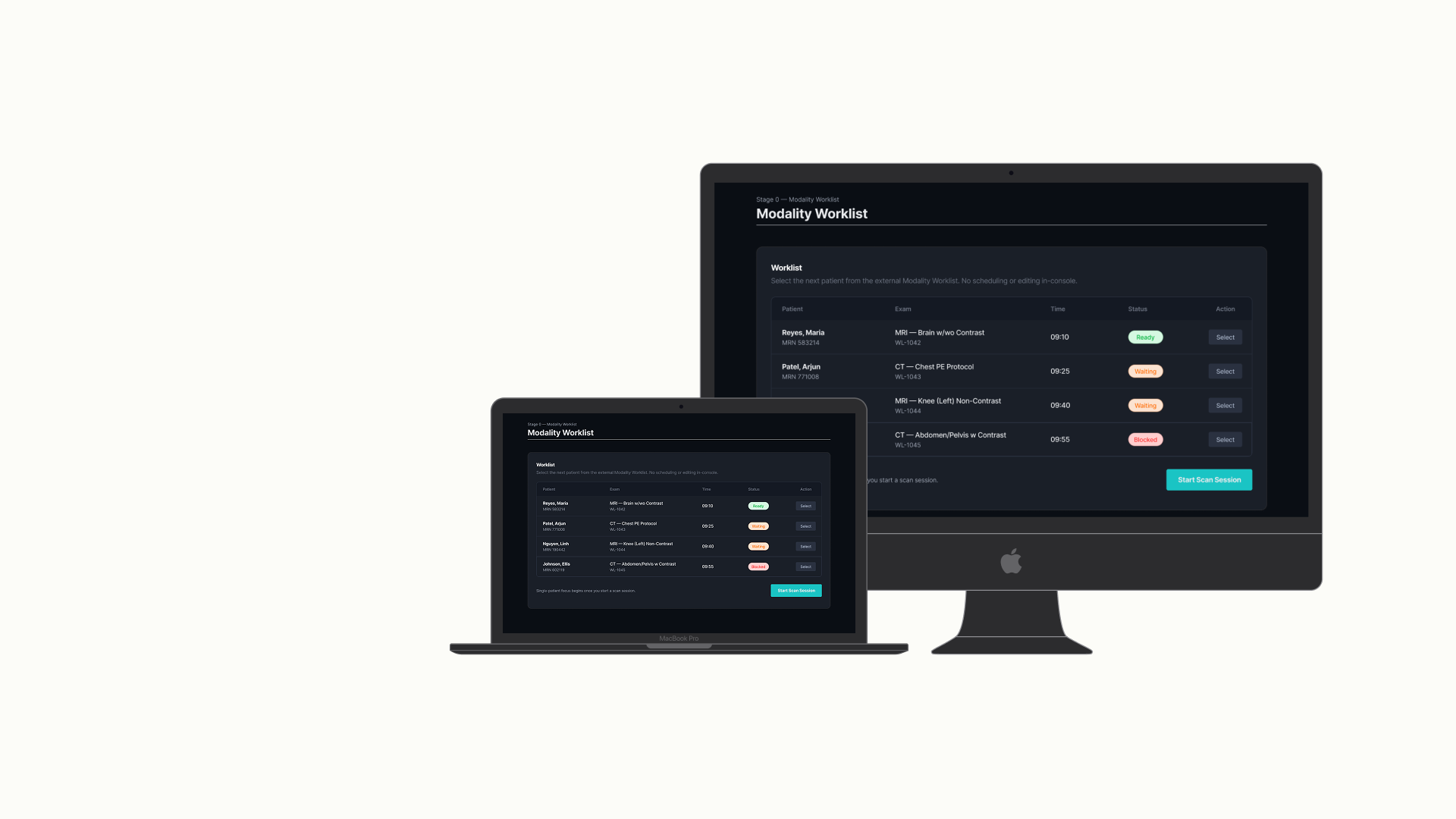
Overview
Radiology technologists operate MRI and CT scanners in high-pressure clinical settings where safety, accuracy, and efficiency directly impact patient outcomes. During a typical imaging session, technologists verify patient safety, configure protocols, monitor scan execution, and ensure image quality before transferring images to PACS.
In many imaging systems, these steps are spread across multiple interfaces. This increases cognitive load and raises the risk of missing safety checks or discovering errors too late.
This personal project investigates how a workflow-driven radiology console can guide technologists through the entire scanning process while simplifying operations. The interface was designed to support AI monitoring agents that can detect anomalies and provide alerts during scan execution.
Problem & Users.
Fragmented systems increase cognitive load during critical clinical tasks.
The Problem
Radiology technologists juggle several responsibilities during scanning: verifying patient safety conditions, selecting the correct imaging protocol, configuring scan parameters, monitoring scan execution, and confirming image quality before PACS transfer.
However, many existing imaging systems separate these tasks across different interfaces like EMR systems, scanner consoles, and protocol libraries. This separation introduces operational risks.
Key issues observed
- Fragmented safety information: Patient safety factors such as implants, renal function, allergies, and pregnancy status often exist in different systems.
- Protocol uncertainty: Technologists may rely on their experience or memory when selecting imaging protocols.
- Errors discovered too late: Motion artifacts or incorrect parameters are sometimes found only after the scan is finished.
- High cognitive load: Technologists need to monitor patient safety, machine performance, and scan progress at the same time.
Primary User
Radiology Technologist
Radiology technologists operate MRI and CT scanners. They are responsible for ensuring both patient safety and diagnostic image quality.
- Time-pressured clinical environment
- Responsible for multiple patients per shift
- Must operate complex imaging equipment
- Rely on clear visual signals and alerts
"Confirm scan readiness, highlight risks early, and avoid discovering problems after the scan."
Secondary User: AI Monitoring Agent
The console supports AI monitoring agents that analyze scan conditions in real-time, detecting motion artifacts, identifying protocol mismatches, monitoring scan progress anomalies, and surfacing alerts during scanning.
Research & Insights.
Deconstructing the scanning pipeline to identify pain points.
Access to hospital environments was limited, so research combined several sources including radiology workflow documentation, imaging console product documentation, clinical workflow studies, and interface analysis of existing systems (Siemens Healthineers, GE HealthCare, Philips Healthcare).
These platforms typically structure scanning workflows around sequential operational stages.
Safety checks occur before scanning but across different systems
Technologists frequently verify patient safety information outside the scanner console.
Protocol configuration is a common source of errors
Incorrect imaging parameters can lead to non-diagnostic scans.
Image quality issues are often detected too late
Motion artifacts may only become visible after the scan is completed.
Structured workflows reduce cognitive load
Step-based workflows help technologists focus on one decision at a time.
System Thinking & Architecture.
MRI and CT scanning involve multiple stages rather than a single interaction. The console was designed around the complete imaging process.
1. Modality Worklist
Scheduled exams, readines status, and patient identity.2. Safety Clearance
Implants, renal function (eGFR), allergies, pregnancy risk.3. Protocol Validation
Selected protocol, rationale, and key imaging parameters.4. Scan Execution
Positioning confirmation, slice planning, live progress, motion indicators.5. Quality Confirmation & PACS Handoff
Sequence previews, transfer status, notes to radiologist.Design Decisions & Trade-offs
-
Decision 1 — Stage-based workflow instead of dashboard layout: Two
approaches were explored (a single dashboard showing all information vs. a guided
stage-based workflow). The stage-based approach was chosen to reduce cognitive load by
showing only the information relevant to the current step.
Trade-off: Less flexibility for advanced users but significantly clearer workflow guidance. -
Decision 2 — Centralized safety verification: Safety information can be
found in multiple systems. The design brings key safety checks into one view to reduce
manual cross-checking.
Trade-off: Requires integration with external systems but improves safety visibility. -
Decision 3 — Alerts during scan execution: Instead of providing alerts
only after the scan is completed, the system surfaces early warnings during
execution.
Trade-off: Additional alerts may make the interface more complex, but they help detect issues sooner.
Interface Design.
The interface focuses on progressive workflow stages to guide the technologist accurately.
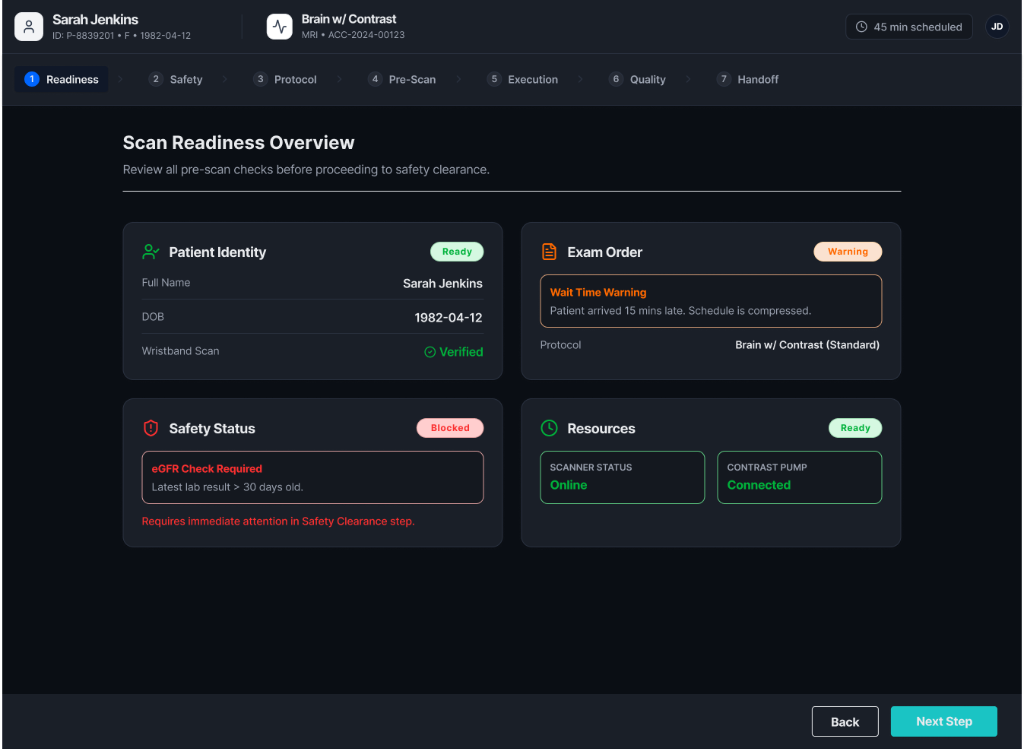
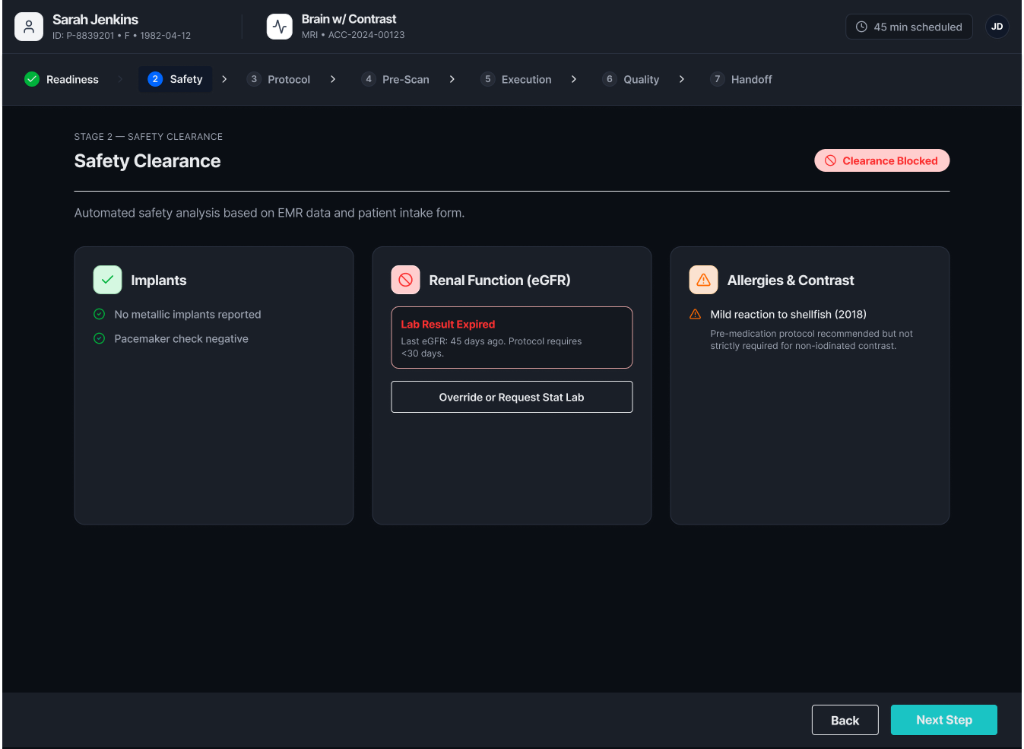
Modality Worklist & Safety Clearance
Shows scheduled imaging studies with readiness indicators so technologists can quickly identify ready cases, blocked cases, or cases requiring attention. Brings safety-critical information together in one interface with statuses: clear, warning, blocked.
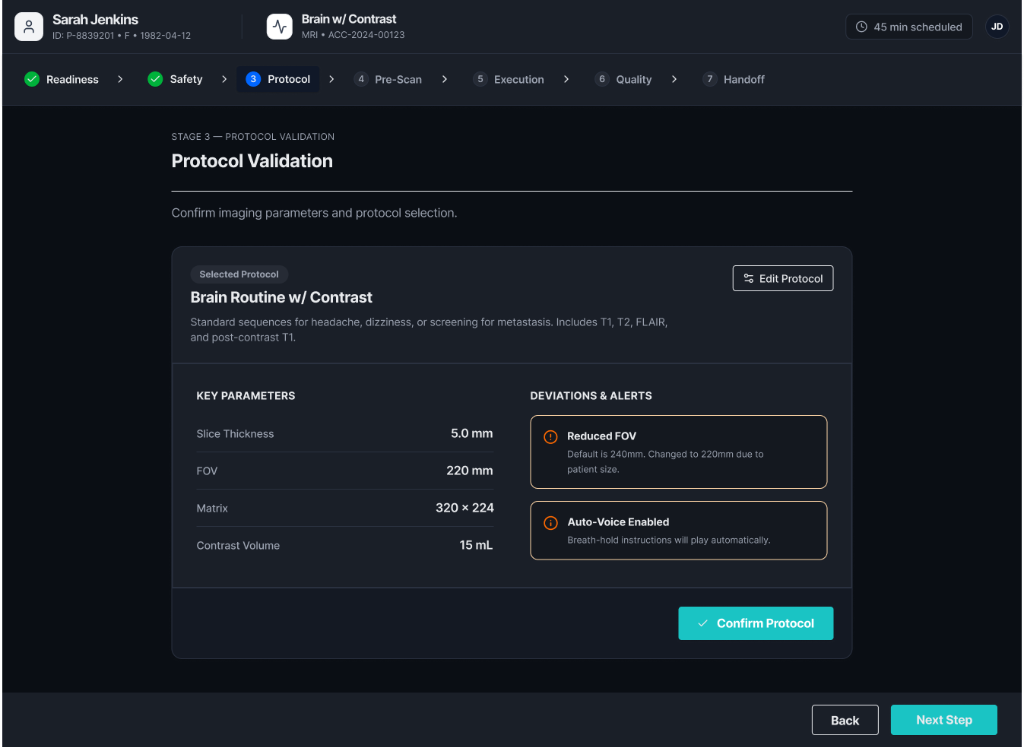
Protocol Validation & Scan Execution
Shows selected imaging protocols and key parameters (slice thickness, field of view, matrix configuration, contrast volume). Provides real-time monitoring including scan progress, sequence status, motion indicators, and system alerts.
Quality Confirmation & PACS Handoff
Technologists review acquired sequences before releasing the patient. Indicators include sequence previews, signal-to-noise ratio, and motion detection. Once approved, the system transfers images to the hospital archive (PACS).
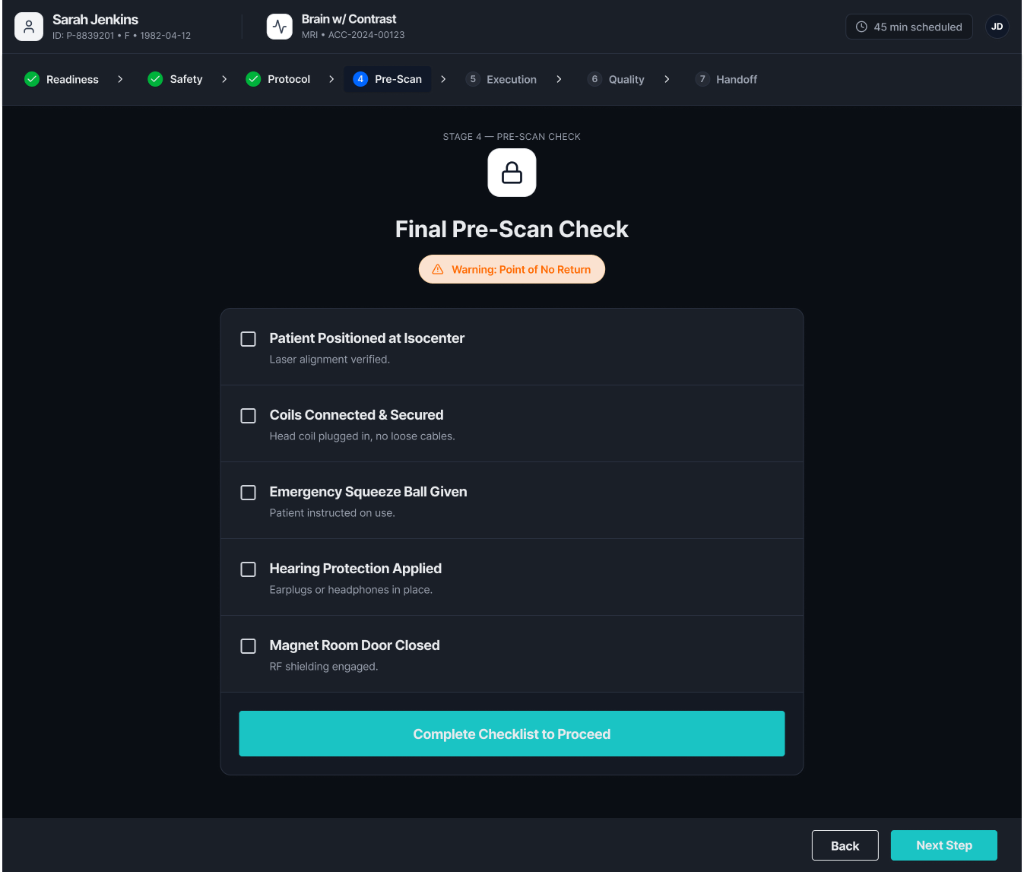
Try the Interactive Prototype
Explore the complete workflow of the radiology console—from modality worklist selection to scan execution and PACS handoff.
Impact & Reflection.
Concept testing with radiology professionals suggested measurable workflow improvements.
Reflection
Designing software for clinical environments needs to prioritize safety, clarity, and preventing errors. Unlike consumer applications, medical systems must function reliably in high-risk environments where mistakes can affect patient outcomes.
This project highlighted the significance of workflow-driven design, early risk detection, and human-AI collaboration in clinical systems.
Next Steps
- Automated artifact detection using machine learning.
- Deeper EMR integration for comprehensive patient records.
- Adaptive protocol recommendations based on patient history.
- Enhanced visualization tools for pre-PACS image review.